
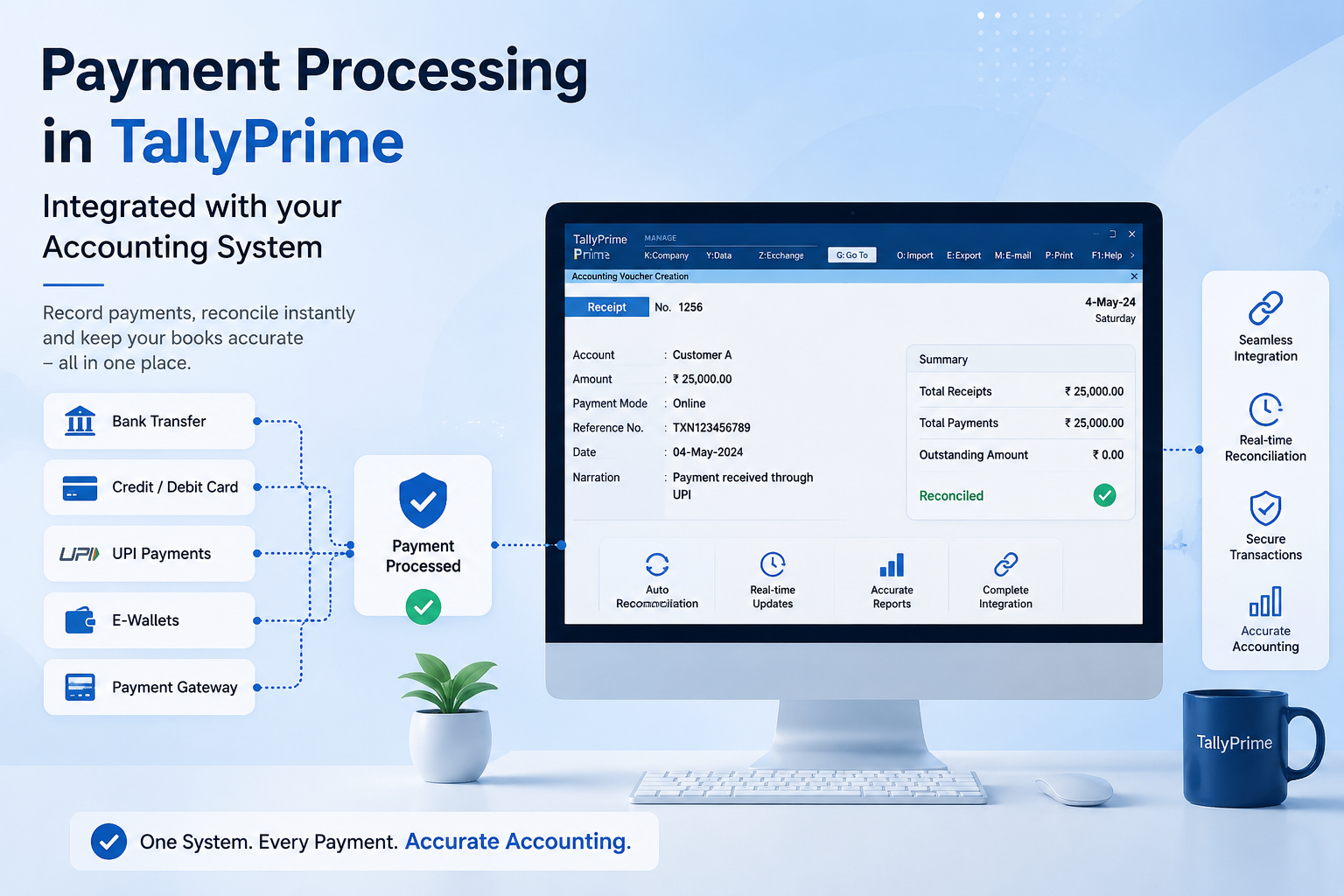
Complete Guide to Payment Processing in TallyPrime (2026)
Every business processes hundreds or thousands of payments monthly — to vendors, suppliers, employees, government authorities, and service providers. Managing these payments manually is time-consuming, error-prone, and difficult to track. Without proper accounting systems, businesses struggle with payment delays, duplicate payments, and poor vendor relationship management.
TallyPrime streamlines payment processing by allowing businesses to create, approve, track, and reconcile payments from a single platform. The system supports multiple payment methods, batch processing, payment status tracking, and comprehensive payment history reporting.
In this guide, we'll explore how TallyPrime simplifies payment processing, reduces administrative overhead, and improves financial control over your accounts payable operations.
Understanding Payments in TallyPrime
Payment processing in TallyPrime is integrated with your accounting system. When you create and record payments, they automatically update your cash accounts, vendor ledgers, and financial reports — eliminating manual reconciliation work.
- Create payments against invoices and open payables
- Support multiple payment methods (bank transfer, cheque, cash, card)
- Batch payment processing for multiple vendors
- Payment approval workflows
- Automatic cash and bank account updates
- Payment status tracking (pending, cleared, cancelled)
- Post-dated cheque management
- Payment history and audit trail
- Integration with bank statements for reconciliation
- Multi-currency payment support
Payment Processing Workflow in TallyPrime
A typical payment processing workflow follows these steps:
| Stage | Activity | System Action |
|---|---|---|
| 1. Vendor Invoice | Receive and record bill from vendor | Creates payable record in vendor ledger |
| 2. Payment Due | Review invoice and approve for payment | Mark invoice as approved in payment queue |
| 3. Create Payment | Create payment voucher for vendor | Updates cash balance and payment status |
| 4. Process Payment | Execute payment via cheque, transfer, or cash | Records payment method and date |
| 5. Reconciliation | Match payment with bank statement | Updates payment to cleared status |
| 6. Audit & Reporting | Generate payment reports and analysis | Provides historical audit trail |
Types of Payment Vouchers in TallyPrime
TallyPrime supports multiple payment voucher types, each designed for specific payment scenarios:
The most traditional payment method for business-to-business transactions and vendor payments.
- Print cheques directly from TallyPrime
- Automatic cheque number tracking
- Post-dated cheque management
- Cheque clearance status tracking
- Stop cheque functionality
- Provides documented proof of payment
- Reduces fraud with proper controls
- Widely accepted by vendors
- Easy reconciliation with bank statements
- Cost-effective for large payments
Electronic payment transfers through NEFT, RTGS, or IMPS for immediate fund transfers.
- Support for NEFT, RTGS, IMPS transfers
- Generate payment file for bank upload
- Track UTR/reference numbers
- Instant payment confirmation
- Integration with online banking
- Faster fund transfers vs. cheques
- Reduced manual entry through file integration
- Better cash flow control
- Automatic reconciliation capability
- Complete audit trail preserved
Direct cash payments for petty expenses, local vendors, and over-the-counter transactions.
Record payments made using corporate credit cards for vendor bills and operational expenses.
- ✓Track credit card transactions separately
- ✓Manage credit card reconciliation
- ✓Record card rewards and benefits
- ✓Match card statements with payments
Creating and Recording Payment Vouchers
The process of creating a payment voucher in TallyPrime involves several steps to ensure accuracy and proper accounting:
Identify the vendor and select which invoices or payables you want to settle.
Select how the payment will be made: cheque, bank transfer, cash, or credit card.
- For Cheque: Cheque number, date, bank
- For Transfer: Bank account, reference number
- For Cash: Amount, payment location
- For Card: Card number, transaction ID
- Automatically deducts from bank account
- Updates vendor payable record
- Tracks payment reference for reconciliation
- Maintains payment method audit trail
Account for early payment discounts, interest charges, or other adjustments to the payment amount.
Record payment reference numbers for audit trail and reconciliation purposes.
- 1Cheque number for cheque payments
- 2UTR or reference number for bank transfers
- 3Transaction ID for card payments
- 4Receipt number for cash payments
Review the payment details, verify amounts, and save the payment voucher to the system.
Batch Payment Processing
Process multiple payments to different vendors efficiently in a single operation using batch payment functionality.
- Process 50+ payments in one session
- Generate payment lists and cheque runs
- Create bank upload files for multiple transfers
- Reduce time spent on individual payment entry
- Maintain consistency across all payments
- Generate vendor payment confirmations
- Apply uniform discounts across multiple vendors
- Create audit reports for batch approval
Batch Payment Workflow
- Review outstanding vendor invoices
- Determine payment priority
- Check cash availability
- Verify vendor bank details
- Create batch payment records
- Generate payment files/cheques
- Obtain approval signatures
- Execute bank transfers or issue cheques
Payment Tracking & Status Management
Track payment status from creation through clearance to maintain visibility and control over your accounts payable.
TallyPrime tracks payment status through multiple stages:
| Status | Meaning | Accounting Treatment |
|---|---|---|
| Draft | Payment created but not yet confirmed | Not recorded in accounts |
| Pending | Payment recorded but not yet executed | Recorded as payment pending |
| Cleared | Payment executed and confirmed by bank | Matched to bank statement |
| Cancelled | Payment cancelled or reversed | Recorded as reversal in accounts |
Monitor payment activity and track pending payments through comprehensive reports.
- Pending Payments Report
- Payment History by Vendor
- Payment Method Summary
- Bank Reconciliation Status
- Cheque Issue Register
- Identify overdue payment obligations
- Maintain vendor payment history
- Track cash outflows
- Reconcile payments with bank
- Audit cheque usage and control
Match recorded payments with bank statement entries to ensure accuracy and detect discrepancies.
- ✓Import bank statements automatically
- ✓Match payment records with bank entries
- ✓Identify unmatched or duplicate payments
- ✓Update payment status to cleared
- ✓Maintain monthly bank reconciliation
Common Payment Processing Mistakes
Avoid these common errors when processing payments in TallyPrime:
Accidentally paying the same invoice twice due to poor tracking or duplicate payment vouchers.
Paying more or less than the invoice amount due to calculation errors or missed discounts.
Transferring payment to incorrect bank account or issuing cheque to wrong party.
Failing to record cheque numbers, payment references, or approval details in the system.
- ✗Create payment without recording cheque number
- ✗Transfer payment without noting UTR/reference
- ✓Always record complete payment reference
- ✓Attach approval documents to payment record
Failure to match recorded payments with bank statement entries on a monthly basis.
Best Practices for Payment Processing
Implement these practices to optimize your payment workflow:
- 1Review Invoices Before Payment — Verify invoice details, amounts, and payment terms before creating payment voucher.
- 2Maintain Vendor Master Data — Keep vendor information current with correct bank details and payment preferences.
- 3Implement Approval Workflow — Require manager approval for payments above threshold amounts.
- 4Use Batch Processing — Process multiple payments together to reduce time and maintain consistency.
- 5Record Complete References — Capture cheque numbers, UTR, and transaction details for audit trail.
- 6Reconcile Monthly — Match all payments with bank statements monthly without exception.
- 7Track Payment History — Maintain complete payment records for vendor relationship management.
- 8Review Pending Payments — Regularly check for overdue or uncleared payments.
Payment Authorization & Controls
Implement proper controls to prevent fraud and ensure accountability in payment processing:
- Define payment authorization limits by staff role
- Require multiple approvals for large payments
- Restrict payment creation to authorized personnel
- Maintain audit trail of all approvals
- Implement segregation of duties (creator vs. approver vs. executor)
- Regular access review and role updates
- Monitor exceptions and unusual payment patterns
- Annual compliance certification
Critical Payment Reports in TallyPrime
These reports provide essential insights for payment management and financial control:
Payment Summary
Total payments by method, vendor, and period for cash flow analysis.
Vendor Payment History
Complete payment history for each vendor with dates and amounts.
Pending Payments
List of all unpaid invoices and upcoming payment obligations.
Cash Flow Forecast
Project cash outflows based on scheduled payments.
Cheque Register
Track all cheques issued with status, dates, and vendors.
Bank Reconciliation
Match payments with bank statement for accurate cash position.
How TallyPrime Payment Features Help Your Business
TallyPrime's payment functionality is designed to address real business challenges:
- Manual payment entry takes too long
- Duplicate payments occur frequently
- Payment status unclear
- Reconciliation is difficult and time-consuming
- Limited payment tracking and history
- Batch payment processing saves hours daily
- Automatic duplicate detection prevents errors
- Real-time payment status visibility
- Integrated reconciliation with bank statements
- Complete payment audit trail and reporting
Streamline Your Payment Processing
Get expert guidance to optimize payment workflows and implement controls in TallyPrime.
Workflow Analysis
Review your current payment processes and identify optimization opportunities
System Configuration
Configure TallyPrime for your payment methods and vendor structure
Control Implementation
Set up approval workflows and authorization limits for your organization
Staff Training
Comprehensive training on payment processing and best practices
Frequently Asked Questions
Can TallyPrime generate cheques automatically?
Yes, TallyPrime can print cheques directly from the system. You can configure cheque printing formats, manage cheque series, and maintain cheque registers. This eliminates manual cheque writing and ensures consistency.
What payment methods does TallyPrime support?
TallyPrime supports cheque payments, bank transfers (NEFT/RTGS/IMPS), cash payments, and credit card payments. You can also integrate with online banking platforms for direct fund transfers.
How does batch payment processing work?
Select multiple vendor invoices you want to pay, review the total amount, and create payment vouchers in one operation. TallyPrime generates payment lists, cheques, or bank upload files for all vendors simultaneously.
Can I track payment status in TallyPrime?
Yes, payments move through status stages: Draft → Pending → Cleared → Archived. You can view payment dashboards and reports showing where each payment stands in the process.
Does TallyPrime integrate with bank reconciliation?
Yes, TallyPrime imports bank statements and automatically matches payments with bank entries. You can identify unmatched or pending payments and update payment status to cleared once matched.
Can multiple people approve a single payment?
Yes, you can set up hierarchical approval workflows where payments require approvals from multiple levels based on amount, vendor, or payment method. This ensures proper authorization and fraud prevention.
Conclusion
Efficient payment processing is critical for business operations and financial control. TallyPrime automates payment creation, tracking, and reconciliation, reducing administrative overhead while improving accuracy and visibility.
By implementing proper payment workflows, batch processing capabilities, and authorization controls — you can minimize payment errors, prevent fraud, and maintain strong vendor relationships. TallyPrime provides the tools and functionality needed to make payment processing seamless and compliant.
Why Buy TallyPrime from Tally Software Shop?
At Tally Software Shop, we deliver complete TallyPrime solutions with expert guidance on payment processing:
Complete TallyPrime Solutions
Genuine TallyPrime licenses, Silver & Gold editions, renewals, and full installation configured for optimal payment processing.
Payment Workflow Setup
Payment configuration, batch processing setup, approval workflow implementation, training, and ongoing support.
Explore More Resources
TallyPrime Pricing & Editions 2026
Compare TallyPrime Silver, Gold, and Edition features with complete pricing information.
📊 Excel to TallyPrimeUpgrade Excel Data to TallyPrime
Learn how to import Excel data into TallyPrime for faster accounting, accurate record management, and seamless business operations.
📚 AccountingUses of Accounting
Discover the importance of accounting in managing finances, tracking business performance, ensuring compliance, and making informed financial decisions.