
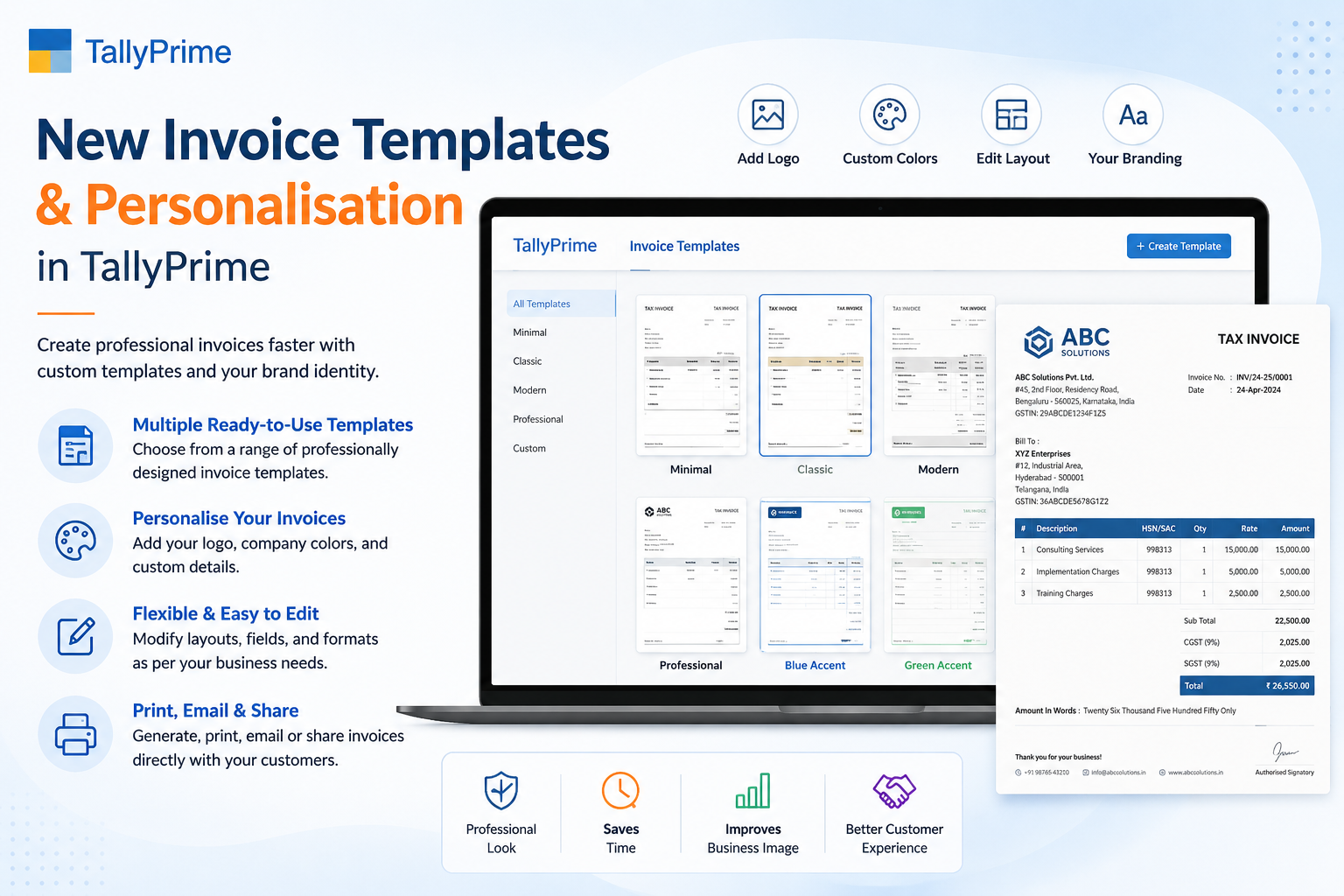
New Invoice Templates and Personalisation in TallyPrime
Invoices are much more than payment documents—they represent your business identity and professionalism. Every invoice you send reflects your brand and leaves a lasting impression on your customers.
TallyPrime enables businesses to create invoices that are not only GST-compliant but also visually appealing and tailored to specific business requirements. With flexible invoice templates and personalization features, organizations can customize invoices to match their brand identity while improving operational efficiency.
What are Invoice Templates in TallyPrime?
An invoice template is the predefined design and layout used for generating invoices. Instead of creating invoices from scratch every time, businesses can use templates that automatically display business information, customer details, tax calculations, payment terms, and branding.
TallyPrime provides flexible invoice layouts that can be customized according to different industries and billing requirements.
Invoice templates typically include:
- Company logo and branding elements
- Business information and contact details
- Customer details and billing address
- Invoice number and date
- Product information and descriptions
- HSN/SAC codes for tax classification
- GST details and tax breakup
- Payment terms and conditions
- Bank details and payment methods
- QR Codes for digital payments
- Signature area for authorization
- Additional notes and disclaimers
Why Invoice Personalization Matters
Businesses compete not only through products and services but also through customer experience. A professionally designed invoice helps build trust and improves communication with customers.
Invoice personalization allows businesses to:
- Improve brand recognition across all communications
- Increase perceived professionalism and credibility
- Simplify customer communication and reduce confusion
- Reduce billing mistakes through standardization
- Maintain consistent formatting across all documents
- Enhance customer confidence in transactions
- Meet industry-specific requirements and standards
Brand Consistency
Instead of generic invoices, companies can create branded documents that look modern, organized, and instantly recognizable.
Professional Image
A well-designed invoice demonstrates that your business maintains organized financial processes and professional standards.
Key Features of Invoice Templates in TallyPrime
1. Professional Invoice Layouts
TallyPrime supports clean and structured invoice designs that improve readability and presentation. Professional layouts help customers quickly understand:
- Product details and specifications
- Tax information and calculations
- Discounts and special offers
- Payment due dates
- Total payable amount
2. Company Branding
Businesses can personalize invoices with complete branding elements:
- Company logo and visual identity
- Brand colours and design themes
- Business name and legal entity details
- Physical address and location
- GSTIN and tax registration numbers
- Contact information (phone, email)
- Website URL and social media links
3. Flexible Item Display
Businesses can customize how products appear on invoices, including:
- Item description and detailed specifications
- Product code and SKU numbers
- Batch number and serial number
- Quantity and unit of measurement
- Rate and pricing information
- Discount percentage or amount
- Tax amount calculation
- Total value per line item
4. GST Compliance
Invoice templates in TallyPrime support all GST requirements by displaying:
- GSTIN of supplier and recipient
- HSN codes for goods classification
- SAC codes for services classification
- CGST (Central GST) amounts
- SGST (State GST) amounts
- IGST (Integrated GST) amounts
- Tax percentages and rates
- Invoice value and tax summary
5. Multiple Invoice Formats
Different businesses require different invoice styles. TallyPrime supports:
- Tax Invoice (standard billing format)
- Retail Invoice (for over-the-counter sales)
- Proforma Invoice (for estimates and quotations)
- Delivery Challan (for goods dispatch)
- Purchase Invoice (for supplier tracking)
- Credit Note (for returns and adjustments)
- Debit Note (for additional charges)
- Export Invoice (for international sales)
What Can You Customize?
One of the biggest advantages of TallyPrime is its flexibility. Businesses can customize almost every section of an invoice to match their specific needs.
- Logo placement and sizing for brand visibility
- Company name in custom fonts and colors
- Address formatting and layout
- Phone number and contact details
- Email address and support information
- Website URL and social media links
- GST Number and tax registration details
- Customer name and business name
- Billing address formatting
- Shipping address (if different)
- Customer GST Number
- Contact person name
- Mobile number and email
- Product name and detailed description
- SKU code and item code
- Quantity and unit of measurement
- Rate or price per unit
- Discount percentage or amount
- Tax calculation and percentage
- Line total and amount due
- Bank details and account information
- Payment instructions and methods
- QR Code for digital payments
- UPI ID for mobile payments
- Terms & Conditions
- Thank You message
- Authorized signature and seal area
Industry-Specific Invoice Customization
Every business has different invoicing requirements based on their industry and business model. TallyPrime allows customization for various sectors:
- Product barcode integration
- Discount and offer display
- GST breakup by rate
- Payment mode selection
- Loyalty points tracking
- Batch number tracking
- Manufacturing date details
- Expiry date information
- Item specifications
- Warehouse location details
- Bulk quantity display
- Dealer pricing structure
- Freight charges inclusion
- Transport details
- Dispatch information
- Service description details
- Project information
- Consultation hours tracking
- AMC (Annual Maintenance) details
- Service period specification
Benefits of Customized Invoice Templates
Professional Appearance
Well-designed invoices create a positive impression on customers. Professional invoices also strengthen brand identity and establish credibility in the marketplace.
Faster Billing Process
Templates eliminate repetitive formatting work. Employees can generate invoices quickly without manual adjustments or corrections, saving valuable time.
Better Accuracy
Standardized templates reduce human errors. Consistent layouts ensure important information is never missed and calculations are always correct.
Strong Brand Identity
Every invoice becomes a branding opportunity. Customers recognize your business through consistent invoice design across all transactions.
Faster Processing
Generate invoices in seconds instead of minutes with automated template layouts and calculations.
Error Reduction
Automatic calculations and standardized fields eliminate common invoicing mistakes and discrepancies.
Professional Image
Branded invoices demonstrate organizational excellence and build customer confidence in your business.
Compliance Assurance
Automatically includes all GST requirements and regulatory compliance elements without manual review.
Better Payment Collection
Clear payment instructions and multiple payment options speed up customer payment processing.
Easy Organization
Standardized formats make invoices easier to file, audit, and retrieve for future reference.
Best Practices for Invoice Design
To create professional invoices, businesses should follow these best practices:
- 1Keep the Layout Clean — Avoid clutter and only display essential information. White space improves readability.
- 2Use High-Quality Logos — A clear company logo improves brand visibility and creates a professional appearance.
- 3Display GST Information Clearly — Tax details should be easy to understand and separately highlighted.
- 4Include Payment Instructions — Provide bank account, UPI ID, QR Code, and payment due date prominently.
- 5Use Consistent Formatting — Maintain the same fonts, spacing, colours, and layout across all invoices.
- 6Add Business Contact Information — Customers should easily find support details for billing queries.
- 7Include Terms & Conditions — Display payment terms, return policy, and warranty information clearly.
- 8Test Before Deployment — Generate sample invoices to verify layout, formatting, and accuracy before using in production.
Common Mistakes to Avoid
Businesses often make invoicing mistakes that affect professionalism and compliance. Avoid these common errors:
| Common Mistake | Impact | Solution |
|---|---|---|
| Missing GST Details | Non-Compliant | Always include GSTIN and tax breakup |
| Incorrect HSN Codes | Audit Risk | Verify codes with tax classification |
| Poor Invoice Formatting | Unprofessional | Use templates for consistency |
| Missing Payment Terms | Payment Delays | Clearly specify due date |
| Inconsistent Branding | Brand Confusion | Use standardized templates |
| Low-Quality Logo | Unprofessional Image | Use high-resolution logo files |
| Missing Customer Info | Delivery Issues | Validate customer details |
| Calculation Errors | Disputes | Use automated calculations |
How Invoice Personalization Improves Customer Trust
Customers appreciate invoices that are clear, professional, accurate, and easy to understand. Branded invoices increase confidence because they demonstrate that a business maintains organized financial processes.
Professional invoices also reduce disputes related to pricing, taxation, and payment terms. When customers receive well-designed, clearly formatted invoices, they feel more confident about the transaction and the business itself.
Frequently Asked Questions
What are invoice templates in TallyPrime?
Invoice templates are predefined layouts that help businesses generate professional, GST-compliant invoices with consistent formatting, branding, and automatic calculations.
Can I add my company logo to invoices in TallyPrime?
Yes. TallyPrime allows you to include your company logo, business details, and complete branding elements in invoice templates. You can customize logo placement, size, and positioning.
Is invoice customization useful for small businesses?
Absolutely. Customized invoices improve professionalism, strengthen branding, simplify the billing process, and enhance customer experience for businesses of all sizes.
Can I create different invoice formats for different customers?
Yes. TallyPrime supports multiple invoice layouts, enabling businesses to use different formats based on customer type, industry requirements, or business model.
Are customized invoices GST-compliant?
Yes. Properly configured invoice templates in TallyPrime automatically display GSTIN, HSN/SAC codes, tax breakups, and all mandatory information required for GST compliance.
How do I change invoice template designs?
Navigate to Invoice Settings in TallyPrime, select the template you want to modify, and customize the layout, branding, and content sections as needed. Changes apply to all future invoices using that template.
Create Your First Invoice Today
Start using TallyPrime's professional invoice templates and create branded invoices in seconds.
Professional Templates
Choose from multiple pre-designed invoice formats or create your own custom template
GST Compliant
All templates automatically include GST requirements and statutory compliance elements
Full Customization
Customize colors, fonts, logo, and layout to match your brand identity perfectly
7-Day Free Trial
No credit card required. Start immediately and cancel anytime with no hidden charges
Conclusion
Invoice templates are more than just layouts—they are an important part of your business communication. A professional, well-designed invoice enhances your brand image, improves customer trust, and simplifies day-to-day billing operations.
TallyPrime's invoice personalization features allow businesses to tailor invoices to their specific needs, ensuring consistency, accuracy, and compliance with GST regulations. By implementing customized templates, organizations can save time, reduce errors, and deliver a polished experience to every customer. Invest in creating customized invoice templates in TallyPrime today and transform your billing process.
Why Choose iSaral for TallyPrime Invoice Setup?
As an authorized Tally partner in Bangalore, iSaral Business Solutions specializes in helping companies implement and optimize TallyPrime for professional invoicing and billing.
Professional Template Setup
Our team designs and configures custom invoice templates that match your brand identity and business requirements perfectly.
Complete Implementation
Receive comprehensive training for your team and ongoing support to maximize invoice customization features.