
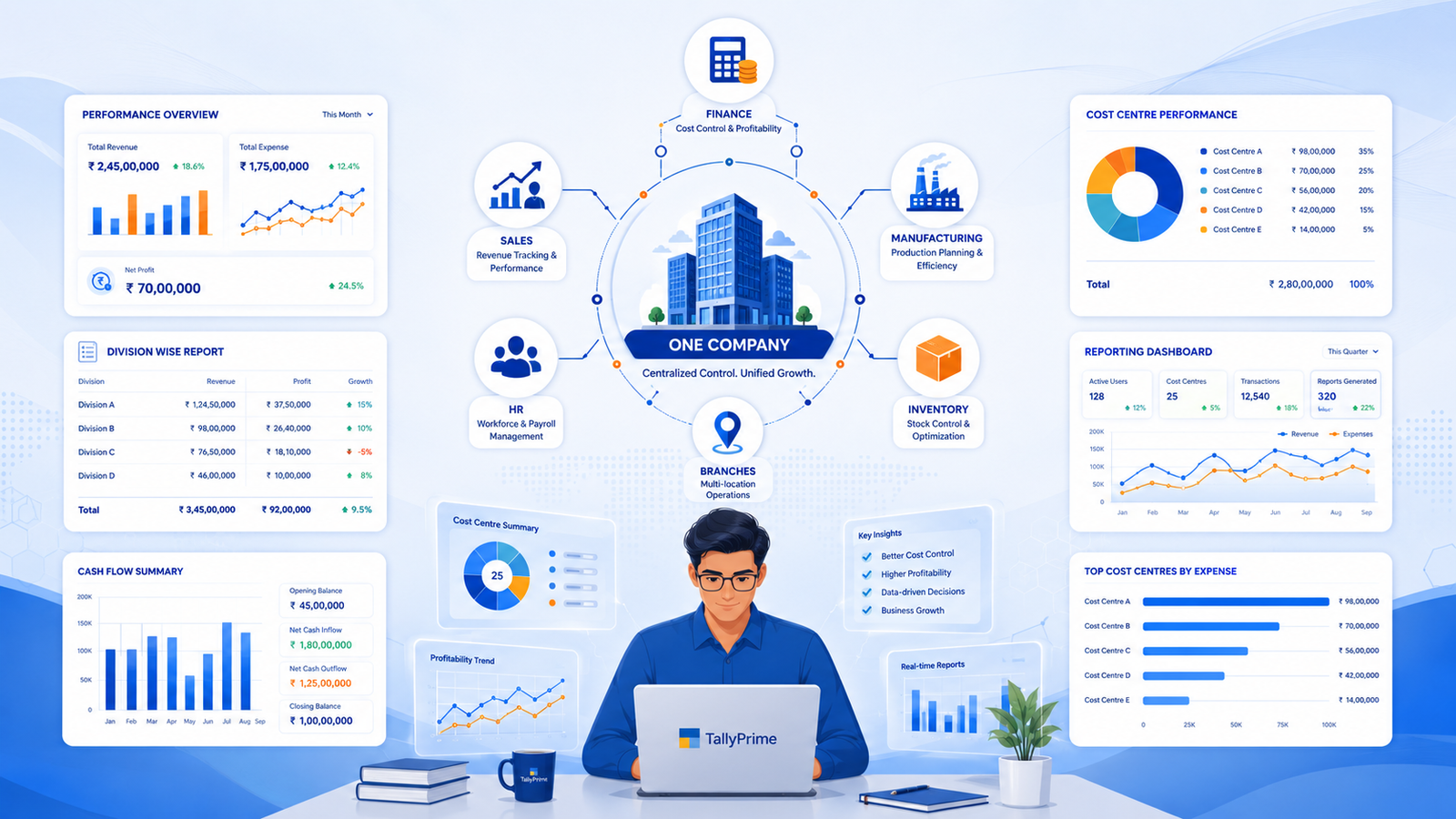
How to Manage Multiple Business Verticals Using Cost Centres and Divisions (2026 Guide)
Many growing businesses operate multiple business units under a single company — different branches, product lines, departments, or service categories across various locations. The challenge is maintaining accurate financial records for each vertical while keeping administration simple and generating consolidated reports.
Creating separate companies for every business vertical increases administrative overhead, makes consolidated reporting difficult, and complicates GST and tax filing. Modern accounting software like TallyPrime allows businesses to manage multiple verticals within a single company using cost centres, divisions, and automated expense allocation while maintaining separate profitability tracking.
In this guide, we'll explore how to structure your accounting for multiple business verticals, set up cost centres effectively, automate expense allocations, and generate insightful reports for each division.
What Are Cost Centres and Divisions?
Cost Centres are accounting units used to record income and expenses separately for each department, branch, or business unit without creating multiple companies. They enable detailed tracking and reporting at the granular level.
- Separate expense and income tracking by division
- Maintain one legal company entity
- Generate division-wise profitability reports
- Track performance metrics for each business unit
- Simplify tax and GST compliance
- Reduce duplicate master data entry
- Enable consolidated financial statements
- Automate inter-divisional allocations
Real-World Examples of Cost Centre Usage
| Business Type | Business Verticals / Cost Centres | Reporting Need |
|---|---|---|
| Retail Chain | Electronics, Clothing, Grocery, Home & Garden | Track profitability by product category |
| Manufacturing | Product Line A, Product Line B, Contract Manufacturing | Measure margin on each product group |
| Education Sector | School, College, Coaching Centre, Online Courses | Revenue and expenses per educational vertical |
| Healthcare | Pharmacy, Clinic, Laboratory, Diagnostic Centre | Department-wise profitability analysis |
| Trading Company | Domestic Sales, Export Sales, Wholesale Distribution | Compare margins across sales channels |
| Multi-Location Business | Branch A, Branch B, Branch C, Head Office | Branch-wise performance comparison |
Why You Shouldn't Create Separate Companies
Many business owners consider creating a separate company for each division. This approach creates significant challenges:
- Duplicate data entry and master data
- Multiple bank accounts to manage
- Separate GST and tax filings
- Higher compliance and filing costs
- Complex consolidated reporting
- Increased accounting staff requirements
- Delayed month-end close process
- Difficulty tracking overall business health
- Centralized data entry and management
- Single bank account structure
- Unified GST and tax filing
- Lower compliance costs
- Easy consolidated reporting
- Smaller accounting team needed
- Faster month-end close
- Complete visibility into all divisions
Benefits of Cost Centres
Implementing cost centres provides immediate and long-term advantages for your accounting and decision-making:
Identify exactly where your money is spent across different business units.
- Division-specific expenses
- Department overhead costs
- Location-based spending
- Shared resource allocation
- Identify cost-saving opportunities
- Control departmental budgets
- Benchmark performance
- Optimize resource allocation
Know exactly which business units generate the most profit and which ones need improvement.
- Revenue per division
- Expense ratio by department
- Net profit by business unit
- ROI per division
- Identify star divisions
- Divest underperforming units
- Allocate growth capital wisely
- Set realistic division targets
Compare planned expenses against actual spending for each cost centre.
Generate customized reports for each department manager showing their division's financial performance.
- ✓Profit & Loss by department
- ✓Department-wise expense breakdown
- ✓Cost centre wise revenue analysis
- ✓Departmental performance trends
Armed with accurate division-specific data, management can allocate resources more efficiently.
Track Expenses Across Multiple Dimensions
Growing businesses often need more than a simple cost centre structure. You may need to track expenses across multiple dimensions:
- Branch + Department: Sales expenses in Branch A's Marketing Department
- Project + Employee: Project 1's labour costs allocated to specific team members
- Location + Product: Manufacturing costs per product line per factory
- Department + Cost Type: Marketing's digital vs. traditional advertising spend
- Division + Region: Product A sales in Northern Region vs. Southern Region
With proper dimensional structure, you can answer complex questions like:
- What is the profitability of Product A in Region B?
- How much did Project C spend on labour vs. materials?
- Which branch is most efficient at expense management?
- What is the cost per transaction by department?
Automating Allocations and Shared Expenses
Rather than manually distributing common expenses, modern accounting software automates allocations, saving time and reducing errors.
Distribute office rent proportionally across multiple branches based on floor area or headcount.
Allocate employee salaries across multiple cost centres based on time allocation or activity codes.
Electricity, Internet, Telephone, and admin overhead distributed across departments.
- 1Electricity bill split by department based on machine hours
- 2Internet charges allocated to all cost centres equally
- 3Admin salaries apportioned by headcount per department
- 4Depreciation distributed proportionally across divisions
Inventory Management Across Business Verticals
Inventory can also be tracked separately for each business vertical, location, or warehouse.
- Track stock levels by warehouse or storage location
- Monitor inventory movement between branches
- Analyze inventory velocity by division
- Record branch-wise stock valuations
- Track slow-moving and fast-moving items
- Generate location-wise stock reports
- Identify stock shortages before they impact operations
- Control inter-branch transfer pricing
- Negative stock in some locations
- Incorrect stock valuations
- Wrong item quantities recorded
- Duplicate inventory entries
- Poor visibility across locations
- Enable inventory controls in system
- Periodic stock verification
- Use barcode-based tracking
- Implement batch/serial number tracking
- Real-time inventory dashboards
Common Mistakes When Setting Up Cost Centres
Below are common pitfalls businesses encounter when implementing cost centre accounting:
An overly complex structure with excessive cost centres becomes unmanageable, while too few centres limit reporting insights.
When staff don't consistently assign expenses to the correct cost centre, reports become unreliable.
Vague or inconsistent cost centre names create confusion during transaction entry.
Better: "Delhi-Branch-Main", "Marketing-Digital", "Manufacturing-ProductLineA"
Without monthly reviews of cost centre reports, errors accumulate unnoticed.
- ✗Review cost centre reports only at year-end
- ✓Review and validate cost centre data monthly
- ✓Follow up on unusual variances immediately
- ✓Reconcile allocations with supporting documents
Creating duplicate customer, vendor, or item masters for different cost centres wastes time and creates reconciliation issues.
Best Practices for Multi-Vertical Accounting
Follow these practices to implement cost centres effectively:
- 1Define Business Structure First — Clearly map out your business divisions before setting up cost centres.
- 2Create Logical Cost Centres — Align cost centre structure with your organizational chart and reporting needs.
- 3Use Consistent Naming Conventions — Establish clear naming rules and document them for all accounting staff.
- 4Train Accounting Staff Thoroughly — Every team member should understand the cost centre structure and assignment rules.
- 5Review Reports Regularly — Monthly analysis of cost centre performance prevents errors from compounding.
- 6Restrict User Access — Limit cost centre assignment permissions to prevent unauthorized changes.
- 7Automate Recurring Allocations — Use software automation for consistent allocation of shared expenses.
- 8Maintain Clean Master Data — Keep one set of customer, vendor, and item masters across all cost centres.
Critical Reports for Multi-Vertical Management
These reports provide essential insights for managing multiple business verticals:
P&L by Cost Centre
Separate profit & loss statement for each business division showing revenue, expenses, and net profit.
Balance Sheet
Consolidated company position with cost centre-wise asset and liability breakdown.
Division Performance
Compare revenue, expenses, and profitability across all business units.
Budget vs. Actual
Track budgeted expenses against actual spending for each cost centre.
Cash Flow
Monitor cash movement across divisions to ensure liquidity.
Allocation Summary
Document how shared expenses were distributed across cost centres.
How TallyPrime Enables Multi-Vertical Accounting
TallyPrime provides comprehensive features specifically designed for managing multiple business verticals:
- Unlimited cost centre creation
- Hierarchical cost centre structure
- Cost centre-wise ledger assignment
- Multi-dimensional cost centre tracking
- Automated expense allocation rules
- Cost centre-wise financial reports
- Budget vs. actual analysis
- Division performance dashboards
Optimize Your Multi-Vertical Accounting
Get expert guidance to structure cost centres and divisions for your business's unique needs.
Business Assessment
Analyze your business structure and accounting requirements
Cost Centre Design
Design optimal cost centre hierarchy for your divisions
Implementation Strategy
Get guidance on setup, allocation rules, and reporting structure
Staff Training
Comprehensive training for your accounting team
Frequently Asked Questions
Can one company manage multiple business divisions?
Yes, absolutely. Cost centres and departmental reporting allow businesses to manage several divisions within a single company while maintaining separate profitability tracking and detailed financial reporting.
Why use cost centres instead of separate companies?
Cost centres offer several advantages: centralized accounting, reduced data entry, unified GST and tax filing, easy consolidated reporting, lower compliance costs, and faster month-end close processes.
What is the ideal number of cost centres for a business?
The number depends on your business structure and reporting needs. Typically, businesses use 5-10 primary cost centres for major divisions, with the option for sub-divisions if needed. Avoid creating too many centres as they become difficult to manage.
Can inventory be tracked separately for different branches?
Yes. Inventory can be monitored separately by warehouse, branch, or location. TallyPrime allows you to track stock levels, valuations, and movements across multiple locations while maintaining a single inventory database.
Can shared expenses be allocated automatically?
Yes. Modern accounting software like TallyPrime supports automated expense allocation rules. You can define rules for distributing rent, utilities, admin costs, and other shared expenses across cost centres based on percentage, headcount, floor area, or other criteria.
What reports are most useful for multi-vertical businesses?
Essential reports include: Profit & Loss by cost centre, Balance Sheet, Division Performance Comparison, Budget vs. Actual, Cash Flow by Division, and Allocation Summary. These provide comprehensive visibility into each business vertical's financial performance.
Conclusion
Managing multiple business verticals doesn't require multiple companies. A well-structured cost centre accounting system within a single company provides the visibility, control, and reporting capabilities you need while keeping administration simple and compliance costs low.
By implementing logical cost centre hierarchies, automating expense allocations, training your accounting team, and reviewing reports regularly — you can optimize your multi-vertical accounting. TallyPrime makes this easier with built-in cost centre functionality designed for growing businesses managing multiple divisions.
Why Buy TallyPrime from Tally Software Shop?
At Tally Software Shop, we provide more than software licenses. We deliver complete accounting solutions tailored to your business structure:
Complete TallyPrime Solutions
Genuine TallyPrime licenses, Silver & Gold editions, renewals, and full installation support configured for your business model.
Expert Cost Centre Setup
Data migration, cost centre configuration, allocation rules setup, remote support, training, and AMC services.
Explore More Resources
TallyPrime Pricing & Editions 2026
Compare TallyPrime Silver, Gold, and Edition features with detailed pricing information.
✓ ComplianceMastering GST Compliance in TallyPrime
Complete guide to GST invoicing, returns, and compliance across multiple locations.
📦 CustomizationTallyPrime Customization
Custom configuration tailored to your multi-vertical business requirements