
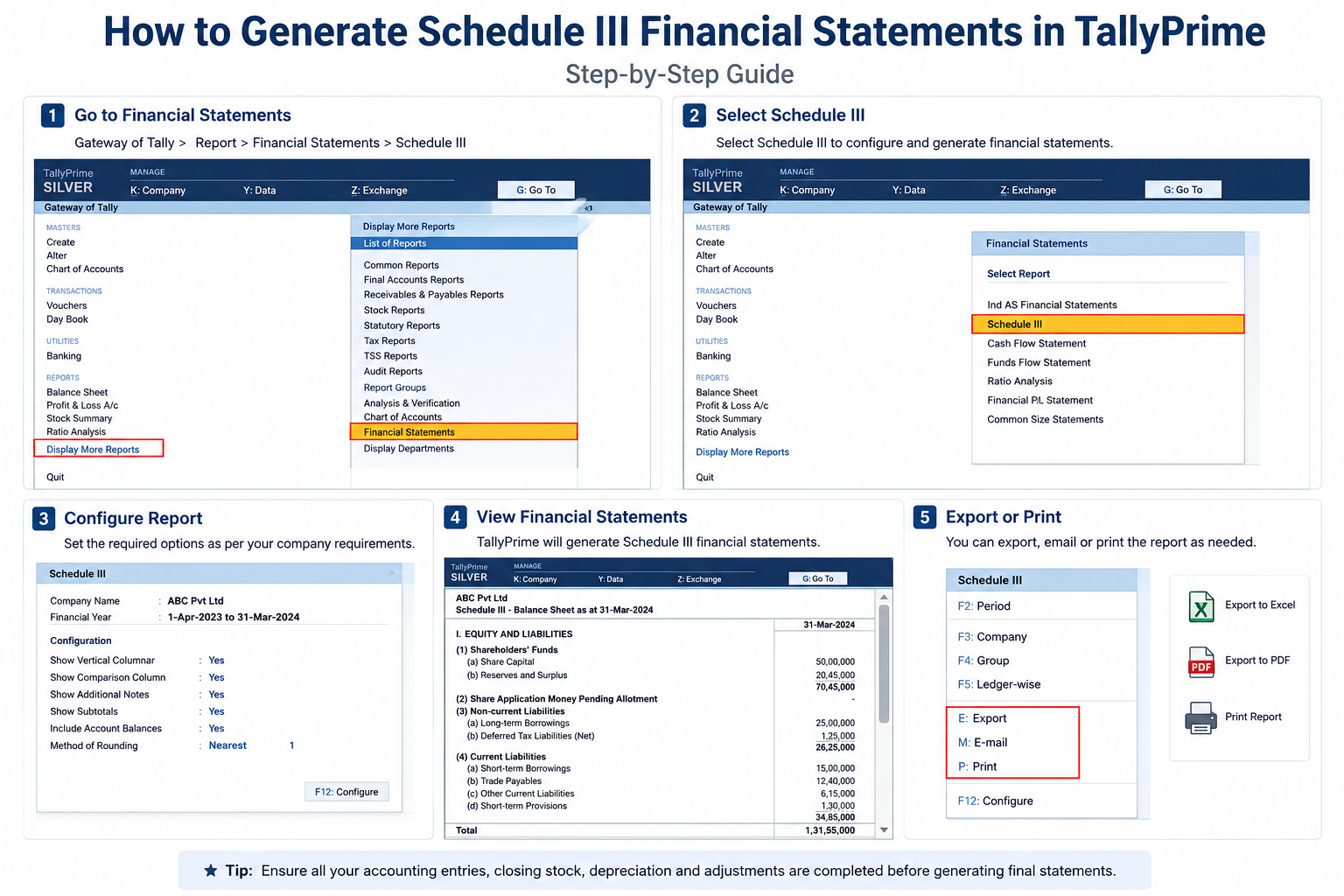
How to Generate Schedule III Financial Statements in TallyPrime
Preparing financial statements that comply with the Companies Act is an essential requirement for every registered company in India. TallyPrime simplifies this process by enabling businesses to generate Schedule III financial statements quickly and accurately. Whether you are a Chartered Accountant, finance manager, or business owner, TallyPrime helps you prepare Balance Sheets, Profit & Loss Statements, Notes to Accounts, and other statutory reports with minimal manual effort.
In this comprehensive guide, you'll learn what Schedule III is, why it is important, and how to generate Schedule III financial statements in TallyPrime step by step.
What is Schedule III?
Schedule III is a framework prescribed under the Companies Act, 2013 that specifies the format for preparing financial statements for companies operating in India. It standardizes the presentation of financial data across all registered companies, ensuring compliance with statutory regulations and improving transparency in financial reporting.
Schedule III Standardizes:
- Balance Sheet structure and format
- Statement of Profit & Loss presentation
- Notes to Accounts requirements
- Disclosure requirements and schedules
- Assets & Liabilities classification
- Current and Non-Current classification
Why Use TallyPrime for Schedule III Financial Statements?
TallyPrime offers a comprehensive solution for preparing statutory financial reports without requiring extensive manual formatting or external tools.
Automated Report Generation
Generate complete Schedule III Balance Sheets and Profit & Loss Statements automatically from your transaction data, with zero manual formatting required.
Built-In Compliance
All reports are automatically formatted according to Companies Act Schedule III requirements. No need for external consultants or compliance tools.
Key Benefits of TallyPrime for Schedule III Reporting:
- ✓Automated Report Generation — Generate Balance Sheets and Profit & Loss Statements in Schedule III format with a single click.
- ✓Accurate Financial Classification — Automatic classification of assets, liabilities, and expenses according to statutory requirements.
- ✓Faster Statutory Compliance — Complete statutory reports ready in minutes instead of hours of manual work.
- ✓Reduced Manual Adjustments — No need for manual journal entries or post-generation corrections.
- ✓Easy Report Customization — Adjust report layouts and schedules based on your company's specific needs.
- ✓Improved Audit Readiness — All supporting schedules and notes automatically generated and linked to final reports.
- ✓Export to Multiple Formats — Export reports as PDF, Excel, or print for audits, management, and regulatory filing.
Features of Schedule III Reporting in TallyPrime
Automated Financial Statements
Generate Balance Sheets and Profit & Loss Statements in Schedule III format with minimal effort. TallyPrime's reporting engine automatically pulls data from your transaction records and formats it according to statutory requirements.
Notes to Accounts
Automatically generate supporting schedules and disclosures required under Schedule III, including:
- Share Capital schedule with share holder details
- Fixed Asset schedule with depreciation calculations
- Borrowings and loan schedules
- Investment schedules with cost and fair value
- Contingent liabilities and commitments
- Related party transaction disclosures
Group Mapping
Map ledger groups accurately to Schedule III reporting categories. TallyPrime comes with pre-configured mappings for all standard business scenarios, which you can customize based on your company's requirements.
Comparative Financial Reports
View previous year's financial data alongside current year reports. Schedule III requires comparative figures for better financial analysis and trend identification.
Export Options
Export reports in multiple formats:
- Excel — For further analysis and management reporting
- PDF — For audits, regulatory filing, and distribution
- XML — For system-to-system integration
Prerequisites Before Generating Schedule III Reports
Before creating Schedule III reports, ensure your TallyPrime company setup is complete and accurate:
- Latest version of TallyPrime is installed and updated
- Company data is complete and accurate
- Ledger groups are correctly classified (Assets, Liabilities, Income, Expense)
- Opening balances are verified and reconciled
- Closing stock is updated for the reporting period
- Depreciation entries are posted correctly
- GST entries are reconciled and matched with GST portal data
- Bank reconciliation is completed for all bank accounts
- All year-end adjustments are recorded
Step-by-Step Guide to Generate Schedule III Financial Statements
Launch TallyPrime and select the required company from the company list. Ensure you are working on the correct financial year and period.
Ensure all accounting entries are complete and accurate for the reporting period.
- Verify all sales invoices are recorded
- Check all purchase bills are entered
- Confirm all expenses are recorded
- Validate journal entries for adjustments
- Reconcile GST entries with GST portal
- Confirm closing stock entry is posted
Navigate to: Gateway of Tally → Reports → Financial Statements → Schedule III
Configure the following settings:
- Company Type (Private Limited, Public Limited, etc.)
- Reporting Period (Financial year and specific date range)
- Division Type (if applicable)
- Include Comparative Figures (Yes/No)
- Notes to Accounts generation (Yes/No)
TallyPrime maps ledger groups automatically to Schedule III reporting categories. Review and verify the mapping:
Assets Classification:
- Fixed Assets (Property, Plant, Equipment)
- Current Assets (Inventory, Receivables, Cash)
- Investments (Shares, Debentures, Properties)
- Cash & Bank Balances
Liabilities Classification:
- Share Capital
- Reserves & Surplus
- Borrowings (Long-term and Short-term)
- Current Liabilities (Payables, Accruals)
Click Generate Report button. TallyPrime will automatically prepare:
- Schedule III Balance Sheet (with comparative figures if selected)
- Statement of Profit & Loss (with comparative analysis)
- Notes to Accounts with all supporting schedules
- Cash Flow Statement (optional)
- Fund Flow Statement (optional)
Before finalizing, conduct a thorough review of the generated reports:
- Verify total assets equal total liabilities plus equity (Balance Sheet equation)
- Check all revenue and expense classifications
- Review notes to accounts for accuracy and completeness
- Confirm statutory disclosures are properly included
- Validate comparative figures match previous year's reports
Export reports in your preferred format for distribution to stakeholders:
- PDF — For auditors, regulatory filing, and formal documentation
- Excel — For management reporting and further analysis
- Print Format — For internal review and board meetings
These reports can be shared with auditors, management, banks, investors, and regulatory authorities.
Components Included in Schedule III Financial Statements
1. Balance Sheet
The Balance Sheet shows your company's financial position at a specific date, displaying:
- Assets (Fixed, Current, Investments)
- Liabilities (Capital, Reserves, Loans, Current Liabilities)
- Equity (Share Capital, Retained Earnings)
- Supporting schedules for each major category
2. Statement of Profit & Loss
The Profit & Loss Statement shows your company's financial performance for a period, displaying:
- Revenue (Sales, Other Income)
- Cost of Goods Sold
- Operating Expenses
- Finance Costs (Interest, Bank Charges)
- Tax Expenses
- Net Profit or Loss
3. Notes to Accounts
Supporting schedules and disclosures required by Schedule III:
- Accounting Policies and assumptions
- Share Capital details with shareholder information
- Fixed Asset schedule with depreciation calculation
- Borrowings schedule with terms and conditions
- Investments schedule with cost and market value
- Contingent Liabilities and Commitments
- Related Party Transactions
- Employee Benefits provisions
- Segment Reporting (if applicable)
Advantages of Using TallyPrime
Businesses benefit significantly from generating Schedule III reports through TallyPrime:
Faster Report Preparation
Generate complete financial statements in minutes instead of hours, with zero manual formatting required.
Improved Accuracy
Automatic classification and calculation eliminates manual errors and formula mistakes common in spreadsheets.
Statutory Compliance
All reports automatically comply with Companies Act Schedule III requirements without additional work.
Better Financial Analysis
Automated reports provide clear visibility into your company's financial position and performance trends.
Improved Audit Readiness
All supporting documentation and audit trails are automatically generated for auditor review.
Easy Export & Distribution
Export reports to PDF, Excel, or print formats for easy sharing with stakeholders.
Who Should Use Schedule III Reports?
Schedule III reporting is useful and recommended for:
- Private Limited Companies
- Public Limited Companies
- Section 8 Companies (NGOs)
- Large Person of Interest (LLP)
- Partnership Firms (some cases)
- Chartered Accountants
- Accounting Firms & Practices
- Finance Managers
- CFOs & Finance Directors
- Internal Auditors
Best Practices for Schedule III Reporting
To generate accurate and compliant Schedule III financial statements, follow these best practices:
- 1Record Transactions Regularly — Enter all invoices, bills, and payments daily to ensure data accuracy and avoid end-of-period rush.
- 2Reconcile GST Monthly — Match your records with GST portal data monthly to catch discrepancies early and ensure correct tax reporting.
- 3Review Ledger Classifications — Periodically audit your ledger accounts to ensure correct classification under Schedule III categories.
- 4Verify Opening Balances — At year-end, confirm opening balances match the previous year's closing balances exactly.
- 5Perform Bank Reconciliation — Reconcile all bank accounts before finalizing financial statements to ensure cash accuracy.
- 6Update Depreciation Periodically — Record depreciation entries monthly or quarterly, not just at year-end, for accurate asset valuations.
- 7Take Regular Data Backups — Backup your TallyPrime company data weekly to protect against data loss and ensure business continuity.
- 8Document Accounting Policies — Maintain clear documentation of accounting policies, assumptions, and any special adjustments used in financial reporting.
Frequently Asked Questions
What is Schedule III in TallyPrime?
Schedule III is a financial reporting format prescribed under the Companies Act, 2013 for preparing company financial statements. TallyPrime automatically generates Schedule III-compliant Balance Sheets, Profit & Loss Statements, and Notes to Accounts.
Can TallyPrime generate Schedule III reports automatically?
Yes. TallyPrime can automatically generate Schedule III Balance Sheets, Profit & Loss Statements, and Notes to Accounts after proper configuration. The reports are generated from your live transaction data with zero manual formatting.
Can I export Schedule III reports to Excel?
Yes. TallyPrime allows exporting reports to Excel, PDF, and print formats. Excel export is useful for further analysis, management reporting, and data sharing with stakeholders.
Is Schedule III available in all TallyPrime editions?
Schedule III features are available in all supported versions of TallyPrime (Prime, Gold, Silver editions). Ensure your software is updated to the latest release for full feature access.
Do I need manual formatting?
No. TallyPrime automatically formats financial statements according to Schedule III guidelines. All reports are generated in the correct format without requiring manual work.
Can I customize Schedule III report layouts?
Yes. TallyPrime allows customization of report layouts, additional schedules, and disclosure requirements based on your company's specific needs and regulatory requirements.
Generate Schedule III Reports Today
Get full access to TallyPrime's statutory reporting features for 7 days, completely free.
Full Access
Access all Schedule III reporting features and statutory compliance tools
No Credit Card
Start your trial instantly without providing any payment details
Expert Support
Get dedicated support from our TallyPrime specialists during your trial
Cancel Anytime
No hidden charges or long-term commitments required
Conclusion
Generating Schedule III Financial Statements in TallyPrime has become significantly easier with its built-in statutory reporting capabilities. Businesses can now prepare accurate Balance Sheets, Profit & Loss Statements, and Notes to Accounts while ensuring complete compliance with the Companies Act, 2013. By automating financial reporting, TallyPrime saves time, minimizes manual errors, and simplifies audits, making it an indispensable solution for modern businesses and accounting professionals.
The best time to adopt TallyPrime for Schedule III reporting is now — before your next financial year closes. Invest in proper accounting software today to ensure your financial statements are always accurate, compliant, and ready for audit.
Why Choose iSaral for TallyPrime Implementation?
As an authorized Tally partner in Bangalore, iSaral Business Solutions specializes in helping companies implement and optimize TallyPrime for statutory compliance and financial reporting.
TallyPrime Setup & Configuration
Our team handles complete TallyPrime implementation, ledger configuration, and Schedule III report setup for your company.
Ongoing Expert Support
Receive comprehensive training for your finance team and dedicated support for all TallyPrime needs throughout the year.